
The Remnant — Documentation
Overview
The Remnant is a drone synthesizer inspired by the SOMA Lyra-8, built as its own instrument around 8 FM voices connected through a feedback matrix. Unlike traditional synthesizers where sound starts from silence, The Remnant creates a persistent signal network -- sound flows between voices, modulating and shaping each other continuously. The result is an instrument that breathes, drifts, and evolves on its own while remaining responsive to your input.
The core signal path: 8 oscillators feed into an 8x8 routing matrix where any voice can modulate any other voice (including itself) via FM synthesis. This creates complex, living textures that range from delicate harmonic shimmer to dense, aggressive noise.
Available as VST3, CLAP and a standalone app on Windows, VST3, AU, CLAP and a standalone app on Mac, and as an AUv3 plus a standalone app on iPhone and iPad.
Voices
The Remnant has 8 independent FM voices (V1 through V8). Each voice is a full oscillator with these controls, arranged vertically in order: Pitch, Fine Tune, Morph, Character, Level. Fine Tune is positioned directly below Pitch for easy access.
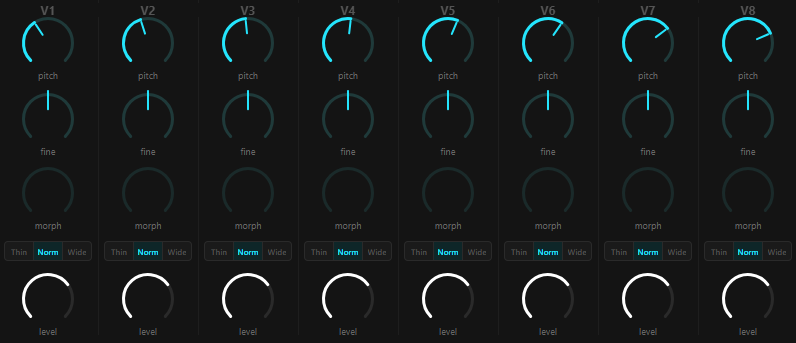
Pitch
- Range: 20 Hz -- 2000 Hz (logarithmic)
- Default: 110 Hz (A2)
- In Free mode, pitch is continuous -- set it anywhere in the range.
- In Harmonic mode, pitch snaps to the nearest note in the selected scale.
Fine Tune
- Range: -50 to +50 cents
- Default: a small different offset for each voice, between -3 and +3 cents, so the voices do not start locked together
- Center-detent knob for precise detuning. Hold Shift (desktop), or on a touch screen drag sideways away from the pitch knob while turning it, for 5x finer control. Use small offsets between voices to create beating and thickness.
Morph
- Range: 0.0 -- 1.0
- Continuous waveshaping using phase distortion synthesis. The single knob controls two underlying parameters simultaneously:
- 0.0 -- 0.33 (Curvature): Blends from sinusoidal slopes to linear slopes, morphing a sine wave into a triangle wave.
- 0.33 -- 0.67 (Symmetry): Shifts from equal half-cycles to asymmetric duty cycle, morphing the triangle into a saw wave.
- 0.67 -- 1.0 (Dissolution): Phase jitter increasingly randomizes the read position, dissolving the saw into filtered noise.
- Every knob position produces a distinct waveform shape, not a crossfade between two fixed waveforms.
Character
- Three settings controlling voice body and weight. Underneath, the value runs from 0 to 1, so automation can move between the settings smoothly:
- Thin (0): A single oscillator. Clean and focused.
- Norm (0.5, the default): The oscillator plus a sub-octave layer at 40% level, and an even blend of the single oscillator and the three-oscillator stack of Wide.
- Wide (1): Three oscillators detuned by -25 cents, 0 and +25 cents and averaged, plus the sub-octave layer.
Level
- Range: 0.0 -- 1.0
- Default: 0.7
- Controls the output amplitude of the voice before it enters the feedback matrix.
Voice Count
- You can reduce the active voice count from 8 down to 4 in Settings. Unused voices are fully disabled to save CPU.
Feedback Matrix
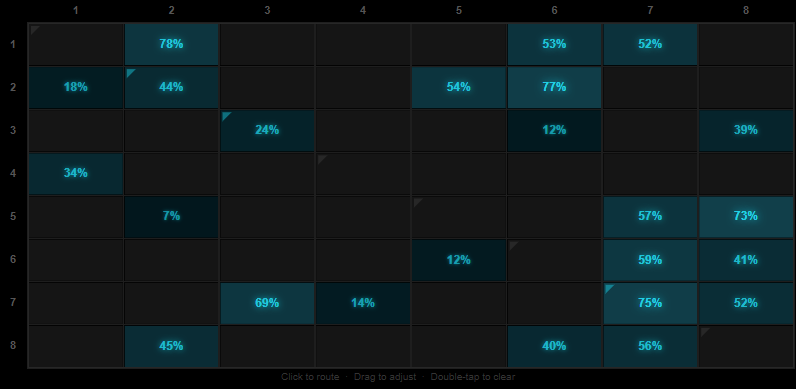
The matrix is the heart of The Remnant. It's an 8x8 grid where rows are source voices and columns are destinations. Each cell controls how much one voice's output modulates another voice's frequency via FM synthesis.
How It Works
- Each cell value (0.0 -- 1.0) sets the FM modulation depth from the source voice to the destination voice.
- Diagonal cells (0->0, 1->1, etc.) are self-feedback -- a voice modulating its own pitch. Their effect is scaled down to 15%, because a voice feeding itself one sample later is far less stable than feedback between voices. A diagonal cell at 100% acts like a cross-voice cell at 15%.
- Off-diagonal cells route one voice's output into another voice's frequency input.
- FM depth scale is 24x: the carrier's frequency is multiplied by 1 plus 24 times the modulation it receives, so a full-scale signal through a cell at 100% can multiply it by up to 25.
- Each voice is soft-clipped with a tanh-like curve before it enters the matrix, which keeps the loop from running away.
Gain Compensation
When the sum of all 64 cell values goes above 4.0, all connections are scaled down together so the sum stays at 4.0. The change is smoothed over 50ms so you hear density rather than explosion.
Topology Presets
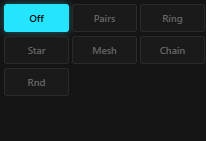
Seven preset routing patterns plus a Custom state are available. The strength of the connections differs per preset and is low, from 0.03 to 0.10, because FM is sensitive. Changing the topology fades the sound out over 2048 samples (about 46 ms at 44.1 kHz), swaps the matrix, then fades back in over another 2048 samples. Returning to Off restores the phases the voices had before.
- Off: All cells cleared. Voices run independently with no interaction.
- Pairs: Bidirectional pairs -- 0<->1, 2<->3, 4<->5, 6<->7, at 0.06 each way. Four isolated feedback loops, each with two voices modulating each other.
- Ring: Circular chain -- 0->1->2->3->4->5->6->7->0 at 0.06, with a weaker counter-flow in the opposite direction at 0.02. Signal flows mainly one way around all eight voices and wraps back.
- Star: Hub topology -- voice 0 feeds all other voices at 0.10 and receives from all of them at 0.04. Voice 0 acts as a central broadcast/receive point.
- Mesh: Full connectivity -- every voice connects to every other voice at 0.03, without self-feedback. Maximum density and interaction.
- Chain: Linear chain -- 0->1->2->3->4->5->6->7, with the strength rising from 0.04 at the first link to 0.10 at the last. Like Ring but without the wrap-back, so voice 7 has no return path.
- Rnd: Random sparse connections (about 35% of the cells, diagonal included) with random strengths from 0.03 to 0.10. Different each time you select it.
- Custom: Shown when you manually adjust matrix cells after selecting a preset while Evolve is Off. The topology label switches to Custom to indicate the routing no longer matches any preset pattern.
Topology presets are starting points. After selecting one you can manually adjust individual matrix cells to fine-tune the routing.
XY Pad
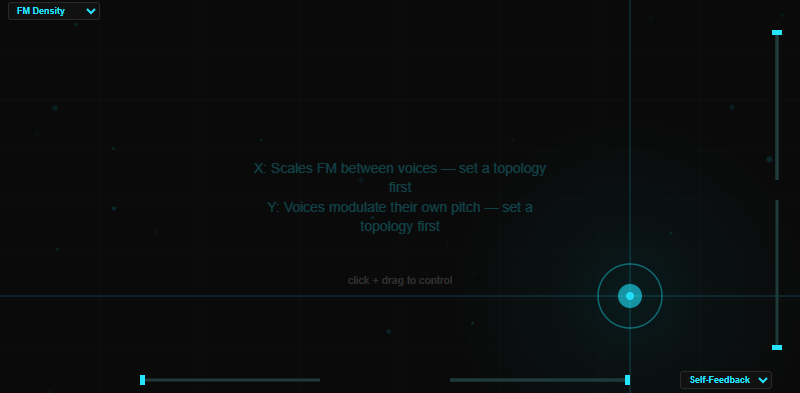
The XY pad is a two-axis performance controller. Drag your finger or mouse to modulate two synth parameters simultaneously.
Axes
- Both X and Y range from -100% to +100%, with 0% as the neutral center.
- Response is smoothed over 10ms for fast, clean gesture tracking.
- The current value of both axes is displayed on the pad readout. Double-tap the pad to reset both axes to center.
Range Controls
Four sliders constrain the output range of each axis:
- X min / X max: Displayed below the XY pad. Limit the horizontal output range.
- Y min / Y max: Displayed to the right of the XY pad. Limit the vertical output range.
- Default is 0--1 (full range) for both axes. Narrowing the range lets you focus the pad on a smaller parameter region for finer control.
Destination Selectors
Each axis has a dropdown to choose what it controls. The dropdowns show an axis prefix (X: or Y:) so it is clear which axis each selector controls. The X destination selector is at the top-left of the pad, Y destination is at the bottom-right. When you select a destination, a hint appears in the center of the pad explaining what that destination does and any prerequisites (for example, FM-related destinations note that a topology must be set first).
There are 12 destinations:
| Destination | Effect |
|---|---|
| FM Density | Scales the FM between voices: none at the low end, unchanged at the center, up to 4x at the high end |
| Self-Feedback | Adds self-modulation to every voice, a strong boost toward the high end and a small inverted amount toward the low end. Nothing at the center. Separate from the diagonal matrix cells |
| Drift Amount | Adds to the Drift amount, more the further the pad is from the center |
| Morph | Shifts the Morph of all voices, down toward the low end and up toward the high end |
| Saturate | Adds to Saturate, more the further the pad is from the center |
| Air | Adds to Air, more the further the pad is from the center |
| Body Decay | Adds to the resonant body decay, more the further the pad is from the center |
| Body Tune | Moves the body tuning by up to two octaves down or up (pick a Body type first) |
| Pitch Spread | Spreads the voices apart in pitch. At the full deflection V1 moves 100 cents down and V8 100 cents up, and the voices in between less. Reversed on the other side of the center |
| Tension | Combined Saturate and self-feedback: up to +70% Saturate and a little extra self-modulation |
| Atmosphere | Combined Air and Body Decay: +60% Air and +40% Body Decay at the full deflection |
| Chaos | Combined Drift and FM density: up to +50% Drift, and the FM between voices scaled from 0.5x to 2.5x |
The compound destinations (Tension, Atmosphere, Chaos) blend two parameters in weighted combination for expressive single-axis control.
Destinations that add to a knob (Drift Amount, Saturate, Air, Body Decay and the compound ones) do so in both directions: what counts is the distance from the center, on top of the knob value, up to the maximum of the knob.
Release Behavior
Configurable in Settings:
- Hold: When you lift your finger, the pad stays at the last position. Next touch continues from there.
- Snap: When you lift your finger, the pad returns to center (0%, 0%). Next touch starts from neutral.
Harmony

The harmony system controls how voice pitches relate to musical scales.
Mode
- Free: Pitches are unquantized. Set any frequency you want.
- Harmonic: Pitches snap to the nearest note in the selected scale and root. The quantization finds the closest scale degree across three octaves around the target pitch.
When switching from Harmonic back to Free, all voice pitches snap to the nearest scale note first, so there's no sudden pitch jump.
Root Note
Select the root of the scale: C, C#, D, D#, E, F, F#, G, G#, A, A#, B.
Scale
13 scales available:
| Scale | Notes per Octave | Intervals (semitones from root) |
|---|---|---|
| Chromatic | 12 | 0,1,2,3,4,5,6,7,8,9,10,11 |
| Major | 7 | 0,2,4,5,7,9,11 |
| Minor | 7 | 0,2,3,5,7,8,10 |
| Dorian | 7 | 0,2,3,5,7,9,10 |
| Phrygian | 7 | 0,1,3,5,7,8,10 |
| Lydian | 7 | 0,2,4,6,7,9,11 |
| Mixolydian | 7 | 0,2,4,5,7,9,10 |
| Harmonic Minor | 7 | 0,2,3,5,7,8,11 |
| Pentatonic Major | 5 | 0,2,4,7,9 |
| Pentatonic Minor | 5 | 0,3,5,7,10 |
| Blues | 6 | 0,3,5,6,7,10 |
| Whole Tone | 6 | 0,2,4,6,8,10 |
| Japanese | 5 | 0,1,5,7,8 |
Keyboard Overlay

Press the Keys button to open a piano (C2 to B5). Tap a key to put the next free voice on that note, tap it again to release the voice and restore its previous pitch. Clear restores all voices. The overlay makes no sound by itself, and it is only available in Harmonic mode. Keys are tuned to A4 = 440 Hz, and in Harmonic mode a voice then snaps to the selected root and scale, so a key outside the scale sounds as the nearest scale note.
Snapshots

The Remnant has 8 snapshot slots (labeled 1--8) for saving and recalling the entire sound state.
What a Snapshot Stores
Per voice (x8):
- Pitch (the actual sounding frequency, including any drift offset at save time)
- Fine tune
- Morph
- Character
- Level
Harmony:
- Harmony mode (on/off)
- Harmony root
- Harmony scale
Body / FX:
- Body type, tune, decay
- Saturate, Space, Air
Drift:
- Drift amount and rate
Evolve:
- Evolve mode, time, depth
Matrix:
- Full 8x8 feedback matrix (64 cells)
- Topology preset
XY Pad:
- X and Y position
- X and Y destination
Not saved: master volume, glide time, glide switch mode, the XY range limits and the Play mode settings.
Saving
Tap and hold a snapshot button to save the current state of all voices into that slot. Populated slots show a cyan border and tinted background so you can see at a glance which slots have saved states.
Recalling
Tap a snapshot button to recall its stored state. All saved parameters glide to their new values over the current Glide Time setting. The active snapshot slot is highlighted with a white border.
Glide
- Range: 0 -- 30 seconds (at 0 the change takes about 10 ms)
- All voice parameters (pitch, fine, morph, character, level), matrix values, body tune and decay, FX, drift and evolve settings, and the XY position ramp simultaneously. The topology and the XY destinations switch at once.
- Clicking a new snapshot while a glide is in progress smoothly redirects toward the new target from the current position, rather than snapping back to the start.
- Drift continues running on top of the glide, so the final pitch is the snapshot target plus any active drift offset.
Glide Switch Mode (Settings)
Controls how harmonic mode changes interact with snapshot recall:
- Start: Apply the snapshot's harmonic mode, root, scale, body type and evolve mode immediately when the glide begins.
- End: Defer those changes until the glide completes.
- Off: Keep the current harmonic mode (Free or Harmonic). The root and scale are taken from the snapshot at once, and the body type and evolve mode switch to the snapshot's values when the glide ends.
Drone vs Play Mode
Drone Mode (default)
All voices run continuously at their set pitches. Sound is always present -- there is no note-on or note-off. This is The Remnant's natural state: a persistent, evolving signal network.
Play Mode
Voices are gated by 8 touch pads or MIDI input. Each pad controls one voice. Switching between Drone and Play mode crossfades over 300ms for a smooth transition.
Pads
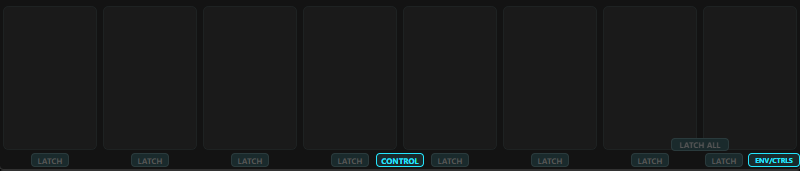
- 8 pads mapped to voices V1--V8.
- Touch a pad to activate its voice; release to let it decay.
- MIDI notes C4 through G4 (60--67) map to pads 0--7.
Per-Voice Latch
Each play pad has an individual latch button. When latch is enabled for a voice, tapping the pad toggles it on -- it stays active until tapped again, without needing to hold. Each voice can be latched independently, so you can sustain some voices while playing others.
Latch All / Unlatch All
One toggle button on the pads view latches all 8 voices when any voice is unlatched, and unlatches all of them when every voice is latched. Useful for quickly setting up a sustained chord or clearing all latches.
Pad XY Expression
Each play pad tracks finger position on two axes while held:
- X axis: Pitch bend for that voice. Slide left/right to detune. The pitch bend range is configurable in Settings.
- Y axis: The vertical position of your finger is also the touch level, so touching higher is louder. When Expression is set to Morph, it also overrides the morph for that voice.
On release, pitch smoothly returns to center and morph crossfades back to the knob value. Double-tap a pad to reset its pitch expression to center. MIDI-triggered pads do not have XY expression.
CTRL Window
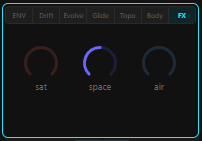
The ENV/CTRLS button at the bottom right of the pads opens a small window over pads 7 and 8. A row of tabs along its top gives you the envelope and every Control section while you keep playing:
- ENV: Attack, Release, Expression target and Bend (described below)
- Drift: Amount and Rate
- Evolve: Mode, Time and Depth
- Glide: Time
- Topo: Topology presets
- Body: Type, Tune and Decay
- FX: Saturate, Space and Air
These are the same parameters as in the Control view. Moving one moves the other, and both follow automation, preset changes and the XY pad. Press ENV/CTRLS again to close the window.
In the compact layout (AUv3 and iPhone), the same tabs sit in two rows in the right column of the Pads page.
Envelope (AR)
When Play Mode is active, each voice has an attack-release envelope:
- Attack: 0.001 -- 2.0 seconds (default 0.01s). How quickly the voice fades in when triggered. The times are time constants: the level is about 63% of the way up after the stated time and about 95% after three times that.
- Release: 0.01 -- 5.0 seconds (default 0.3s). How quickly the voice fades out when released. It is also a time constant, so the tail takes several times the stated value to die away completely.
Expression Target
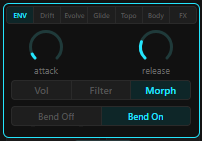
The tab buttons along the top of this window (Drift, Evolve, Glide, Topo, Body, FX) give you the parameters of the Control view right here, with the same functionality, so you can shape the sound while you play the pads.
Choose what the envelope controls:
- Volume: The envelope directly multiplies voice amplitude. At zero, the voice is silent.
- Filter: The envelope also opens a per-voice lowpass filter, on top of the volume envelope. At zero the voice is silent.
- Morph: The vertical position of your finger on the pad overrides the morph value of that voice while the pad is held. Slide your finger up/down to change the voice waveform in real time. The envelope still controls the volume. When released, morph returns to the knob value. The morph knobs are dimmed when Expression is set to Morph, since the pad position is controlling the value.
Control View Toggle
In Play mode, a CONTROL button appears between pad 4 and pad 5 along the bottom edge. Pressing it switches the bottom section from the play pads to the full drone controls view (network graphic, drift, evolve, topology, body, FX). A Pads button switches back. To reach the controls without leaving the pads, use the CTRL window instead.
Pitch Bend
- Bend On (default): Pad X-axis sliding bends the pitch of each voice. The bend range is configurable in Settings (+/-2, 12, 24, or 48 semitones).
- Bend Off: Pad X-axis sliding has no effect. Use this for patches where pitch stability is important.
Drift Engine
The drift engine adds organic pitch instability to the voices, making them wander slightly like analog oscillators.
Amount
- Range: 0.0 -- 1.0 (default 0)
- At 0, voices are perfectly stable (drift is fully bypassed).
- At 1.0, voices can drift up to +/-5% of their base frequency, about +/-0.85 semitone (roughly 85 cents).
- Each voice drifts independently with its own random LFO.
Rate
- Range: 0.0 -- 1.0, maps to 0.02 -- 2.0 Hz (default 0.3)
- Controls how fast the pitch wanders. Each voice picks a new random target once per cycle, every 0.5 to 50 seconds, and glides toward it. Low values give slow, glacial movement. High values create faster wobble.
Evolve System
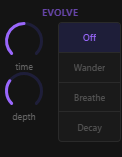
The evolve system autonomously mutates the feedback matrix over time, creating self-generating textures without manual intervention.
Modes
Off (default)
The matrix stays exactly as set. No autonomous modulation.
Wander
Each matrix cell that is switched on gets its own random walk modulation layered on top of its baseline value. Cells drift up and down independently, creating unpredictable shifts in the feedback routing. The result is a texture that continuously morphs in character. Wander only moves connections that are already on. It never switches on a cell that is at zero.
Breathe
A cosine wave modulates the density of all active matrix cells together. The entire matrix periodically swells and recedes as a unit, creating a pulsing, breathing quality. The depth parameter shapes the intensity curve.
Decay
A one-shot linear fade. All matrix cells multiply down from 1.0 toward 0.0. The network gradually dissolves into silence and stays silent until you change the mode. Useful for fade-out automation or creating textures that slowly die away.
Time
- Range: 5 seconds -- 10 minutes (default 60s, logarithmic)
- Sets the cycle duration. In Wander and Breathe modes this is the period of one full cycle. In Decay mode this is how long until the matrix reaches zero at full Depth. At a lower Depth it takes the Time divided by the Depth.
Depth
- Range: 0.0 -- 1.0 (default 0.3)
- Controls the intensity of modulation.
- In Wander: how far each cell can deviate from its baseline.
- In Breathe: how deep the density dip goes. At the default of 0.3 the cells swing between about 60% and 100% of their value. From about 0.6 upward they swing all the way between 0% and 100%.
- In Decay: how fast cells fade (higher depth = faster decay).
Glide

- Range: 0 -- 30 seconds (default 0)
- Controls the transition time when recalling snapshots.
- At 0, snapshot recall takes about 10 ms.
- At higher values, all voice parameters (pitch, fine tune, morph, character, level), matrix values, body tune and decay, FX, drift and evolve settings, and the XY position smoothly ramp to their new values.
- Glide applies to all saved parameters simultaneously -- not just pitch.
Resonant Body Filter
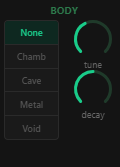
A parallel bank of resonant bandpass filters that adds acoustic character to the output, simulating the resonance of physical structures. The resonators listen to a mono mix of all voices and their output is added on top of the unfiltered sound.
Type
Five modes, each with a different resonator configuration. Switching between types crossfades smoothly with no clicks or pops.
None
Filter bypassed. Clean, direct output.
Chamber
4 resonators with golden-ratio frequency spacing (1.0, 1.618, 2.618, 4.236). Q range 2--12. Warm, room-like resonance with harmonically related peaks.
Cave
3 resonators with close, dark spacing (1.0, 1.3, 1.9). Q range 1.5--6. Deep, sub-heavy coloration with a cavernous quality.
Metal
5 resonators with inharmonic bar-mode spacing (1.0, 2.76, 5.4, 8.1, 11.3). Q range 8--80. Harsh, metallic ring with high-Q peaks that ring for a very long time at extreme decay settings.
Void
2 resonators with wide, sparse spacing (1.0, 3.14). Q range 0.8--3. Subtle, open coloration. The most transparent of the resonant modes.
Tune
- Range: 20 -- 4000 Hz (default 200 Hz, logarithmic)
- Sets the base frequency of the lowest resonator. All other resonators are spaced as multiples of this frequency according to the mode's ratio table.
Decay
- Range: 0.0 -- 1.0 (default 0.5)
- Controls the Q (resonance) of all resonators, interpolating between the mode's minimum and maximum Q values.
- At 0, resonators are wide and subtle.
- At 1.0, resonators ring long (especially in Metal mode).
Adaptive Response
The filter automatically reduces its wet level when the voices are loud, preventing muddiness, by up to 40% at full level. Quiet inputs get more coloration; loud inputs stay cleaner.
FX Section
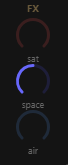
Three effects applied after the feedback matrix and resonant body.
Saturate
- Range: 0.0 -- 1.0 (default 0)
- Warm tanh soft-clipping distortion. A subtle floor of saturation is always present (even at 0) to keep the signal warm. Increasing the value raises the gain into the clipper from 1x to 40x for progressively heavier overdrive, with makeup gain to keep the level up. It runs at 2x oversampling.
Space
- Range: 0.0 -- 1.0 (default 0.5)
- Stereo spread using equal-power panning. Voices are distributed across the stereo field, evenly spaced in pan angle:
- Voice 0 pans hard left
- Voice 7 pans hard right
- Voices 1--6 are evenly spaced between
- At 0, all voices are centered (mono). At 1.0, maximum stereo width.
Air
- Range: 0.0 -- 1.0 (default 0)
- A dark Freeverb-style reverb (a Schroeder design with fixed high damping). Adds depth and space to the output.
- Air sets both the size of the room, and so the tail length, and the wet amount. At 0 the reverb is off. At 1.0 the signal is fully wet and no dry sound is left.
- The reverb takes a mono sum of the mix and makes its own stereo image. It runs at the host sample rate.
Preset System

Navigation
- Use the < and > arrows to step through presets.
- The current preset name is displayed in the top bar.
Randomize
The RND button generates a random variation based on the current view:
- On the Voice page: randomizes the voices (pitch, morph, character, fine tune, level), the body settings, Saturate, Space and Air, the drift settings, and the harmony root and scale. Topology, matrix routing, evolve, the XY pad and the play settings are left alone.
- On the Matrix page: every cell has a 35% chance of getting a random strength between 0 and 80%, and all the others are set to 0. This replaces the routing. It does not keep the current topology.
Mutate
The MUT button perturbs the current patch based on the current view:
- On the Voice page: each voice, body, FX, drift and harmony setting has about a 70% chance to move by up to +/-15% of its range.
- On the Matrix page: each cell that is on has about a 70% chance to move by up to +/-15%. Cells at zero stay at zero.
Saving Presets
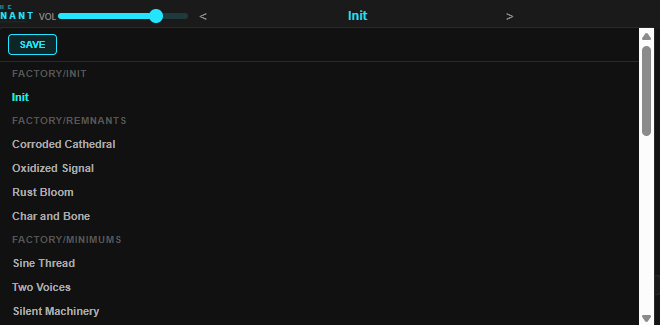
Click the preset name in the top bar to open a dropdown with a Save button. Clicking Save opens a naming dialog where you can type a name for your preset (it pre-fills the current name unless you're on Init). Press Enter to confirm or Escape to cancel. Saved presets go to the User category and appear alongside factory presets in the navigation order.
What Presets Store
- All APVTS parameters (voice pitches, matrix cells, FX settings, mode selections)
- The full snapshot bank (all 8 snapshot slots and their contents)
- Presets do NOT store Settings page values (voice count, tuning reference, etc.) -- those are per-instance and persist across preset changes.
- Master volume is excluded from presets and persists independently across preset changes.
Network Visualization
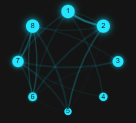
The main display includes a real-time visualization of the voice network.
What It Shows
- Network graphic: 8 nodes for the voices with lines for the matrix connections. The lines follow the cell values (stronger cells draw brighter and thicker), and the graphic pulses gently by itself. It shows the routing, not the level of each voice.
- Voice filaments: Each voice column shows a set of thin filaments that follow that voice's output level. They wobble more when the voice receives a lot of signal through the matrix.
The display updates at about 30 Hz.
Settings
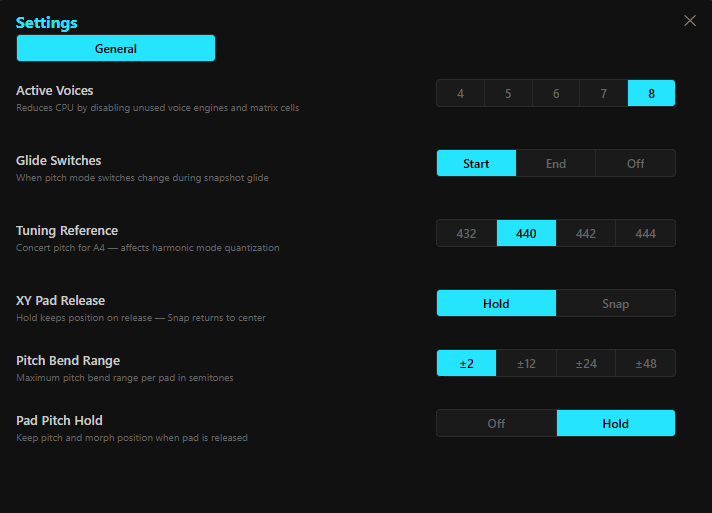
The Settings panel (gear icon) contains per-instance configuration that persists across preset changes.
Voice Count
- Options: 4, 5, 6, 7, 8
- Default: 8
- Reduces the number of active voices. Unused voices are fully disabled to save CPU. Useful on mobile devices or when you want a simpler patch.
Glide Switch Mode
- Start: When recalling a snapshot, apply its harmonic mode, root, scale, body type and evolve mode immediately.
- End: Wait until the glide finishes before switching those.
- Off: Keep the current harmonic mode (Free or Harmonic). The root and scale are taken from the snapshot at once, and the body type and evolve mode switch to the snapshot's values when the glide ends.
Tuning Reference
- Options: 432 Hz, 440 Hz, 442 Hz, 444 Hz
- Default: 440 Hz
- Sets the A4 concert pitch reference used for scale quantization in Harmonic mode.
XY Release Mode
- Hold: XY pad stays at last position when you release.
- Snap: XY pad returns to center when you release.
Pad Pitch Hold
- Off: Pitch and morph expression reset when you release a pad.
- Hold: The pitch bend is retained while the pad is latched or its release tail sounds. Morph returns to the knob value shortly after release.
- Persists across AUv3 instances and preset changes.
Pitch Bend Range
- Options: +/-2, +/-12, +/-24, +/-48 semitones
- Default: +/-2 semitones
- Controls how far the X-axis pitch bend extends on play pads.
Compact View (iOS / AUv3)
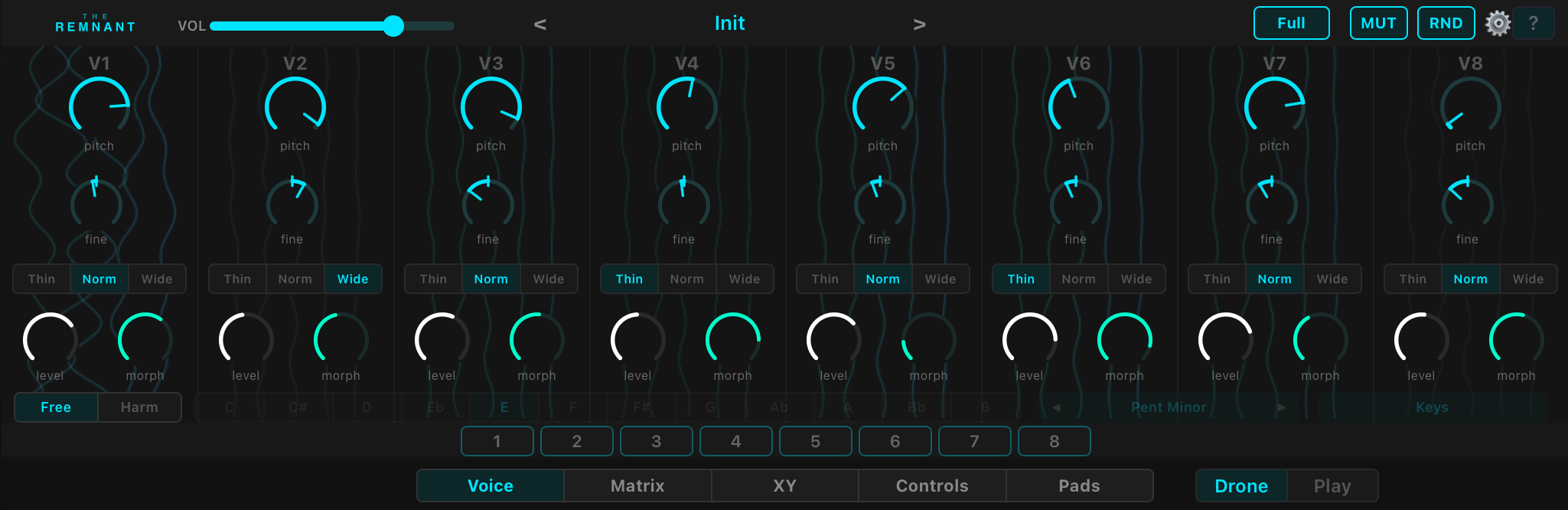
On iOS and in compact AUv3 host windows, The Remnant switches to a space-efficient layout with 5 tabbed pages.
Pages
Voice
All 8 voice controls: pitch, fine tune, morph, character (Thin/Norm/Wide) and level per voice. The harmony row (Free/Harm switch, root, scale and the Keys button) is on this page too.
Matrix
The 8x8 matrix grid and topology preset buttons. Tap cells to adjust connection strengths.
XY
The XY performance pad with destination selectors and range controls.
Controls
Drift (amount, rate), Evolve (mode, time, depth), Glide, Topology, Body (type, tune, decay), and FX (saturate, space, air).
Pads
The 8 play mode pads with the Drone/Play toggle. The right column has two rows of tabs: ENV, Drift, Evolve, Glide on top and Topo, Body, FX below. The ENV tab holds the envelope controls (attack, release), the expression target selector (Volume/Filter/Morph) and the Bend On/Off toggle. The other tabs hold the same controls as the Controls page, so you can shape the sound while you play. For the Voice, Matrix or XY controls while playing, use the full view (see the tip below).
Compact-Specific Behavior
- iPhone: Always uses compact view, landscape only, no layout toggle.
- iPad Standalone: Uses the full view with a safe area inset at the bottom.
- iPad AUv3: Uses compact view by default. The layout toggle saves your choice, and it takes effect when you remove the plugin from your chain and add it again, or restart the app.
Tip for AUM and other hosts: in a small plugin window, such as AUM's strip view, The Remnant shows one page at a time. The Voice, Matrix and XY controls are then hidden while you play the pads. To play the pads and reach those controls at the same time, switch the plugin window from strip to full view in AUM.
Navigation
A tab bar along the top switches between the 5 pages. Snapshot buttons and the preset bar remain visible across all pages.
Master Volume

- Range: 0.0 -- 1.0
- Default: 0.75
- A horizontal slider controlling the final output level. Located in the top bar next to the preset controls. It is applied after the reverb and before the DC blocker and the soft clipper.
MIDI
In Play mode, The Remnant responds to MIDI notes:
- C4 through G4 (MIDI notes 60--67) trigger pads 0--7.
- Velocity maps to the touch intensity of each pad.
- In Drone mode, MIDI input is ignored.
Technical Notes
Signal Path
- 8 oscillators generate audio at the host sample rate. Each voice is soft-clipped and scaled by its Level
- Feedback matrix applies FM cross-modulation between voices (fed back one sample later)
- Space distributes voices across the stereo field
- Resonant body filter adds acoustic coloring
- Saturation applies soft-clip distortion, at 2x oversampling
- Air reverb adds tail
- Master volume
- DC blocker removes offset
- Soft clipper, then a hard clamp to [-1, 1]
CPU Considerations
- Only the Saturate stage runs at 2x the host sample rate. Everything else runs at the host sample rate
- Reducing voice count in Settings directly reduces CPU load
- Setting Drift Amount to 0 fully bypasses drift processing
- Evolve mode Off bypasses matrix modulation
- Body type None bypasses the resonant filter
Latency
The 2x oversampler for Saturate introduces a small amount of latency, reported to the host for automatic delay compensation.
Acknowledgments
Special thanks to Gavinski's Tutorials for extensive beta testing, feature suggestions, and feedback that shaped this instrument.